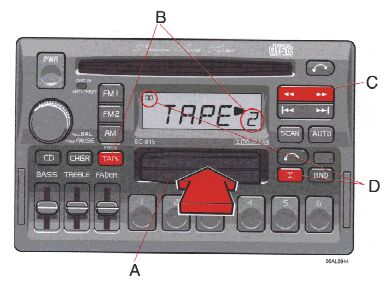
pg. 1:56 Cassette deck |
A - Cassette slot
The cassette is inserted with the open side to the right (side 1 or A of the cassette upwards). When the cassette is inserted, the radio is disengaged and the cassette will start to play automatically. "TAPE
 " or "TAPE
 " is displayed to indicate which side of the tape is being played. When one side of the tape has been played the unit will automatically play the other side (auto-reverse). The cassette can be inserted or ejected even when the unit switched off.
B - Reversing the tape (PROG)
Press the button to play the other side of the tape.
The side of the tape being played will be displayed.
C - Fast winding
The tape is advanced with "
 " and rewound with "
 ". The tape side indicator in the display will flash rapidly during the fast winding.
Fast winding can be stopped by pressing the button again.
D - Dolby B NR button
Press this button when you use tapes recorded with the Dolby B noise reduction system. The Dolby symbol
 will be indicated in the display.
pg. 1:57 Cassette deck |

A - Next selector
Press the "
 " button and the tape will automatically advance to next song. There must be a pause of approx. 5 seconds between songs for this function to operate.
B - Previous selector
Press the "
 " button and the tape will automatically rewind to the previous song. There must be a pause of approx. 5 seconds between songs for this function to operate.
C - Pause
If you press the "volume" knob the tape is stopped, the unit is silent and "PAUSE" is displayed. To restart the tape press the knob again.
D - Scan
Press this button to listen to the first five seconds of each song. Press it again to stop scanning.
pg. 1:58 Cassette deck |
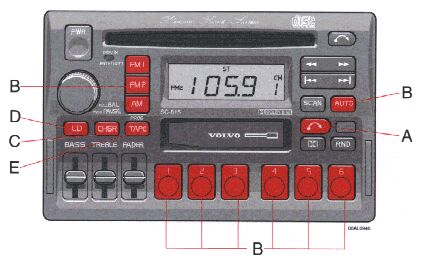
A - Cassette eject
If the button is pressed the tape will stop and the cassette will be ejected. The radio will be automatically engaged. The radio, CD or CD changer will engage automatically (depending on which mode was activated before the tape was played).
B - To re-enter Radio mode
There are three alternative ways to re-enter Radio mode:
C - To re-enter Tape mode
If the Tape function has been disconnected and the cassette has not been ejected, the Tape mode can be re-entered by pressing the "TAPE" button.
D - To re-enter CD mode
If the CD function has been disconnected and the CD has not been ejected, the CD mode can be re-entered by pressing the "CD" button.
E - To re-enter CD changer mode
If the CD changer function has been disconnected, the CD changer mode can be reentered by pressing the "CHGR" button.

