pg. 1:59 CD - Single |
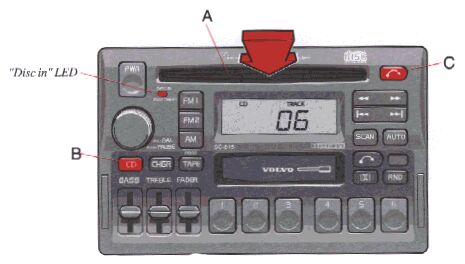
A - CD slot
With the audio system on, insert a disc into the slot with the label side up. When the CD is inserted, the radio is disengaged and the CD will start to play automatically.
The CD can be inserted or ejected even when the unit is switched off.
When the CD has been inserted into the player, the "DISC IN" light will always be ON even if the radio, tape deck or CD changer are in use.
B - CD mode selector
Press "CD" to actuate the CD mode. The track last listened to will continue to play. If the CD-player is empty, "No CD" will be displayed.
C - CD eject
If the button is pressed the CD will stop and the disc will be ejected. The radio will be automatically engaged. The radio, tape or CD changer will engage automatically (depending on which mode was activated before the CD was played).
NOTE: If the CD eject button is pressed and the disc is not removed within 12 seconds, the disc will not be drawn into the CD player again.
pg. 1:60 CD - Single |
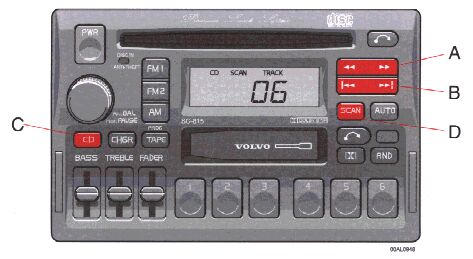
A - Music search
Press the "
 " or "
 " button to search within a track. While the button is depressed the playing time for this track will be displayed.
B - Changing the selected track number
Press "
 " for forward selection or "
 " for backwards selection. The chosen track number will be displayed.
C - Playing- time display
When the "CD" button is pressed the playing time for the current track is displayed for 5 seconds.
D - Scan
Press this button to listen to the first ten seconds of each track. Press it again to stop scanning.
pg. 1:61 CD - Single |
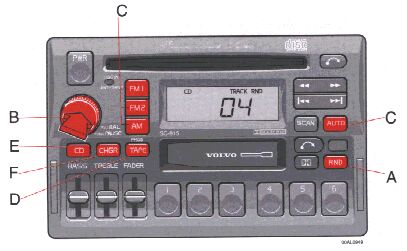
A - Random choice
Press "RND" to actuate the random mode. From A disc, tracks will be played at random. "RND" will be displayed when this function is engaged.
B - Pause
If you press the "volume" knob the disc is stopped, the unit is silent and "PAUSE" is displayed. To restart the disc press the knob again.
C - To re-enter Radio mode
There are two ways to re-enter Radio mode:
D - To re-enter Tape mode
If a cassette is already inserted, the tape deck will re-engage if the "TAPE" button is pressed.
E - To re-enter CD mode
If the CD function has been disconnected and the CD has not been ejected, the CD mode can be re-entered by pressing the "CD" button.
F - To re-enter CD changer mode
If the CD changer function has been disconnected, the CD changer mode can be re-entered by pressing the "CHGR" button.
pg. 1:62 CD - Remote (certain models) |
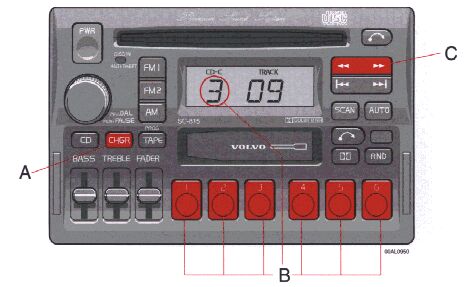
A - CD changer mode selector
Press "CHGR" to actuate the CD changer mode. The disc/track last listened to will continue to play. If the CD-changer cartridge* is empty, "---" will be displayed. If a selected disc does not exist, the disc number and "5--" will be displayed and the next disc will be automatically selected.
* The functions pertaining to the CD-changer are only applicable if the unit has been connected to the Volvo CD-changer, which is sold separately as an accessory, or on certain models, standard on the car.
|
B - Disc number selector
Depress one of the preset buttons (1-6) to select the disc number desired. The selected disc number and track number will be displayed.
C - Music search
Press the "
" or "
" button to search within a track. While the button is depressed the playing time for this track will be displayed.
pg. 1:63 CD - Remote (certain models) |
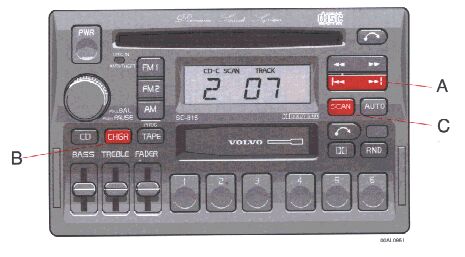
A - Changing the selected track number
Press "
" for forward selection or "
" for backward selection. The chosen disc number and track number will be displayed.
B - Playing-time display
When the "CHGR" button is pressed the playing time for current track is displayed for 5 seconds.
C - Scan
Press this button to listen to the first ten seconds of each track. Press it again to stop scanning.
pg. 1:64 CD - Remote (certain models) |
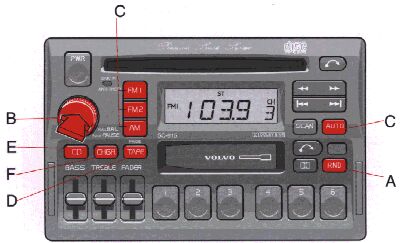
A - Random choice
Press "RND" to actuate the random mode. From a disc chosen at random, 4 tracks will be played (also chosen at random). A new disc will then be played in the same way. "RND" will be displayed when this function is engaged.
B - Pause
If you press the "volume" knob the disc is stopped, the unit is silent and "PAUSE" is displayed. To restart the disc press the knob again.
C - To re-enter Radio mode
There are two ways to re-enter Radio mode:
D - To re-enter Tape mode
If a cassette is already inserted, the tape deck will re-engage if the "TAPE" button is pressed.
E - To re-enter CD mode
If the CD function has been disconnected and the CD has not been ejected, the CD mode can be re-entered by pressing the "CD" button.
F - To re-enter CD changer mode
If the CD changer function has been disconnected, the CD changer mode can be reentered by pressing the "CHGR" button.
pg. 1:65 Technical specifications |
SC-815
Power output:
4 x 20 W (10% dist.)
Output impedance:
4 Ohms
System voltage:
12 Volts, negative ground
Radio
System: PLL (Phase Lock Loop) system with tuned RF (Radio Frequency) front and end automatic wide band gain control. Electronic suppression circuitry (noise killer).
Frequency range:
FM 87.9-107.9 MHz
AM 530-1710 kHz
Sensitivity:
FM 1.1╣V
AM 20 ╣V
Stereo separation 35dB
Cassette deck 4-track, 2-channel stereo
Full logic electronic tape transport
Tape speed:
4.76 cm/sec.
Channel separation
53dB
Frequency range
30-15000 hz
S/N
56 dB without Dolby B NR
S/N
66dB with Dolby B NR
Wow and Flutter
less than 0.06%
Pinch-off
"Dolby"
and the double D symbol
|


 are the trademarks of Dolby Laboratories Licensing Corporation. Dolby noise reduction manufactured under license from Dolby Laboratories Licensing Corporation.