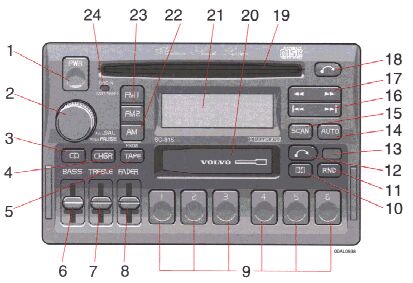
pg. 1:50 Premium Sound System SC-815 (certain models), general description |
1. On/off (push)
2.
TP = Applicable only in Tape Mode
CD = Applicable only when in CD mode and connected to a CD changer.
pg. 1:51 Anti-theft code |

Anti-theft code
The radio features anti-theft circuitry. If the set is removed from the vehicle or if the battery power is disconnected, a special code must be entered to enable operation of the set.
Refer to the radio code card supplied with your vehicle or ask your retailer for the correct code.
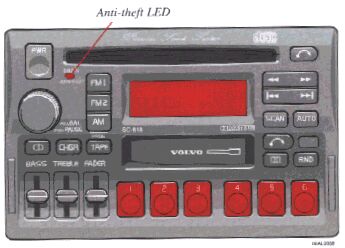
When the car is parked with ignition key removed the anti-theft LED will flash.
To enter the code
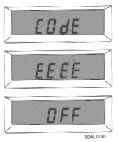
After installation or when the set has been disconnected from power, the set displays "CODE" when it is switched on.
Enter the 4-digit code using the preset buttons.
If the correct code is entered the set is entered the set is ready to use.
If you enter an incorrect code you must enter the correct code again from the beginning.
Incorrect code
If an incorrect code has been entered "EEEE" is displayed. Enter the correct code. After three unsuccessful coding attempts the set will lock and remain locked for two hours.
"OFF" is displayed.
During this waiting period:
pg. 1:52 Radio - SC-815 |
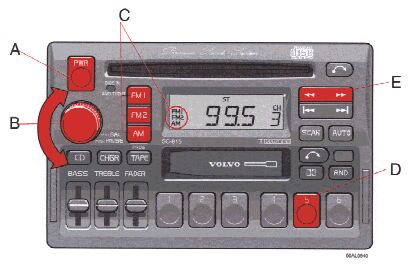
A - On/off switch
Push the button to switch on the radio. Press the button slightly longer to turn the radio off.
B - Volume control
Turn the button clockwise to increase the volume. The volume control is electronic and has no end stop.
C - Waveband selector
The desired waveband is set by pressing one of the waveband selector bands. The frequency and waveband is shown on the display.
NOTE:
There are two FM wavebands and one AM waveband. This makes it possible to store 2 x 6 FM stations and 6 AM stations in memory.
D - Setting frequency selection
The radio can be used in most parts of the world by changing the frequency selection intervals as follows:
Depress and hold preset button 5 and turn the radio ON. "USA" will flash on the display. Each time button 5 is pressed, the frequency selection will change from "USA" to "AUS", etc. When the correct country name is displayed, wait 5 seconds and the radio will be ready for use.
E - Manual tuning
Press the left side tune button to tune to lower frequencies and the right side to tune to higher frequencies. The tuned frequency is displayed.
ST will be displayed to indicate stereo FM reception.
pg. 1:53 Radio - SC-815 |

A - Seek tuning up/down
Press the left side tune button to tune to lower frequencies and the right side to tune to higher frequencies. The radio seeks the next audible station and stops there. If you wish to continue the seek tuning, press the tune button again.
B - Preset programming
1. Tune to the desired frequency.
2. Depress and hold a prest button. The audio will cut out. Keep the button depressed until the audio comes on again (approx. 2 seconds).
3. The frequency is now stored on this present button.
C - Preset buttons
To select a pre-programmed radio frequency, depress the preset button. The set frequency will be displayed.
pg. 1:54 Radio - SC-815 |
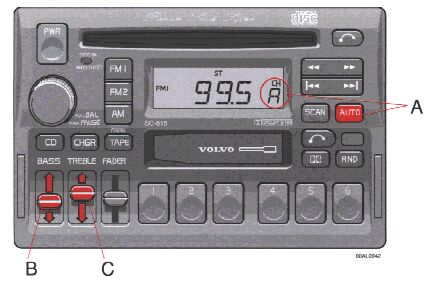
A - Automatic programming (AUTO)
This function automatically seeks and stores up to 8 strong AM or FM stations.
This is especially useful when travelling in areas where radio stations are unfamiliar.
1. Depress and hold the "AUTO" button for
at least 1 second
. A number of strong stations (max. 8) on the chosen waveband are now automatically stored in the memory.
The lowest frequency station is heard. If there are no audible stations, "----" is displayed.
2. Press the "AUTO" button (
for less than 1 second
) to obtain another autostored station.
A new station will be selected each time the button is pressed momentarily.
B - Bass control
Adjust the bass by sliding the control up or down (up to increase, down to decrease). A "detent" indicates "equalized" bass.
C - Treble control
Adjust the treble by sliding the control up or down (up to increase, down to decrease). A "detent" indicates "equalized" treble.
pg. 1:55 Radio - SC-815 |
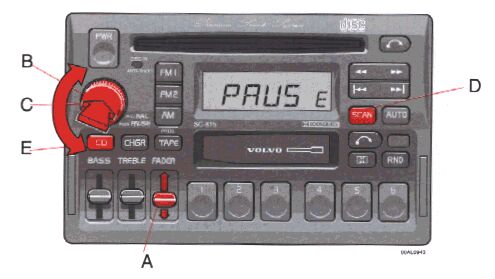
A - Fader control
Adjust front/rear speaker balance by sliding the control up or down.
(Up to direct more sound to the front speakers, down to direct more sound to the rear speakers.
The "detent" indicates "equalized" front/rear balance position.
B - Pause function
Press the "volume" knob to temporarily mute the sound. "PAUSE" is displayed.
C - Balance control
Pull out the "volume" knob and adjust the left/right balance by turning the knob counterclockwise or clockwise.
D - Scan
Press this button to listen to each station for five seconds. Press it again to stop scanning.
E - Active Sound Control (ASC)
The ASC function automatically adjusts the volume level of the audio system according to driving speed.
To deactivate ASC depress the "CD" button until "ASC" is no longer displayed.
To activate ASC, depress the "CD" button until "ASC" is displayed (approx. 2 seconds).

