
Resetting the clock
The digital clock can be reset by pressing one of the two buttons (A and B) with a pointed object such as the tip of a pen.
h = hours
m = minutes
Maintain the pressure on the buttons for more than four seconds to change the time more quickly.
Ambient temperature sensor
This sensor indicates the temperature slightly above the road surface. An
amber
warning lamp (C) lights up when the temperature is in the range of 23 - 35° F (-5 - +2° C).
Please note that this lamp does not indicate a fault with your car.
At low speeds or when the car is not moving, the temperature readings may be slightly higher than the actual ambient temperature due to the heat generated by the engine.
Display alternatives
If buttons A and B are pressed down simultaneously, it is possible to shift between four different display alternatives, as follows:
Press 1st time: 12 hour clock and °F
Press 2nd time: 24 hour clock and °F
Press 3rd time: 12 hour clock and °C
Press 4th time: 24 hour clock and °C
NOTE: If your battery has been disconnected, the display will default to the 24 hour clock and degrees centigrade.

Trip computer
The trip computer offers six functions which are presented in a single display. The cursor indicates the selected function. The trip computer's clock is shown permanently in the left-hand field. Refer to the previous page for more detailed information regarding the clock function.
The following data is monitored by the computer:
Warning function
The trip computer is equipped with two warning functions:
NOTE:
The low ambient temperature warning always has the highest priority on the display panel.
* See page 1:14.
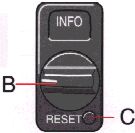
Trip computer controls
Select one of the trip computer's six functions by using control B. The Reset button (C) is used to reset the following functions:
NOTE: If pressure is maintained on the button for another three seconds, all three of the functions mentioned above will be reset.

Average speed ь mph (Canada: km/h)
Average speed since the function was last reset. When the ignition is switched off, the average speed is stored in memory and is used as the basis for the new figure when the engine is started again. It can be reset by pressing the reset button on the trip computer control.

Current fuel consumption mpg (Canada: L/100 km)
Continuous information on current fuel consumption, calculated once per second. When the car is not moving, the display shows "---".

Average fuel consumption ь mpg (Canada: L/100km)
Average fuel consumption since the function was last reset. When the ignition is switched off, the average fuel consumption figure is stored in memory until it is reset using the button on the trip computer control.

Ambient temperature
Shows the ambient temperature just above the road surface while driving. When the temperature is in the range 23-36° F(-5 - +2° C), the ambient temperature sensor activates and amber warning light. Please note that this light does not indicate a fault with your car. At low speeds or when the car is not moving, the temperature readings may be slightly higher than the actual ambient temperature due to the heat generated by the engine.

Tripmeter in miles (Canada: km)
Shows the distance driven since the function was last reset. This value is stored in memory until it is reset using the reset button on the trip computer control. The trip meter displays 10 yard intervals (Canada: 10 meters) until you have driven 1 mile (Canada: 1km), after which distance will be measured in miles (km).

Driving distance on current fuel reserve mile 0 (Canada: km)
Shows the distance which can be driven on the fuel remaining in the tank, calculated on the basis of the average fuel consumption and the amount of fuel remaining in the tank at the time of the reading. When the quantity of fuel drops to below 1.8 US gals. (8liters), a warning light in the instrument panel comes on and the cursor beside the "Driving Distance on Current Fuel Reserve" symbol is activated. This take place regardless of the function currently selected. When the driving distance on the current fuel reserve is less than 5 miles (8 km), the display shows "---".

